HubSpot App

Format My Leads logo Guide

Streamline your HubSpot data with effortless cleaning and standardization. Use Format My Leads to automatically format phone numbers and keep records consistent across your CRM.

Format My Leads Integration Overview

This app solves key business challenges by automatically formatting data within HubSpot. Starting with phone numbers, it converts unformatted entries into a clean, consistent format—making your records easier to read, search, and use across your CRM. Formatting is seamlessly applied through Workflow Actions and CRM Cards, allowing you to automate data standardization directly within your existing processes. The best part? Additional formatting capabilities for other data types are on the way, helping you maintain a clean and consistent HubSpot database—without the manual effort.

Installation

1
Sign in to your HubSpot account.
2
Install Format My Leads from the HubSpot App Marketplace and select the correct portal.
3
Choose a plan (monthly or yearly) and complete payment details.
4
After confirmation, the Format My Leads actions appear in your workflows.
Tip: You can manage your plan and support from the account dashboard after installation.

Features

Automatically format phone numbers in HubSpot using Workflows.

  • Clean, consistent data makes your CRM easier to use and search.
  • More formatting options coming soon—no manual work required.

Instantly format new incoming leads as soon as they’re created in HubSpot.

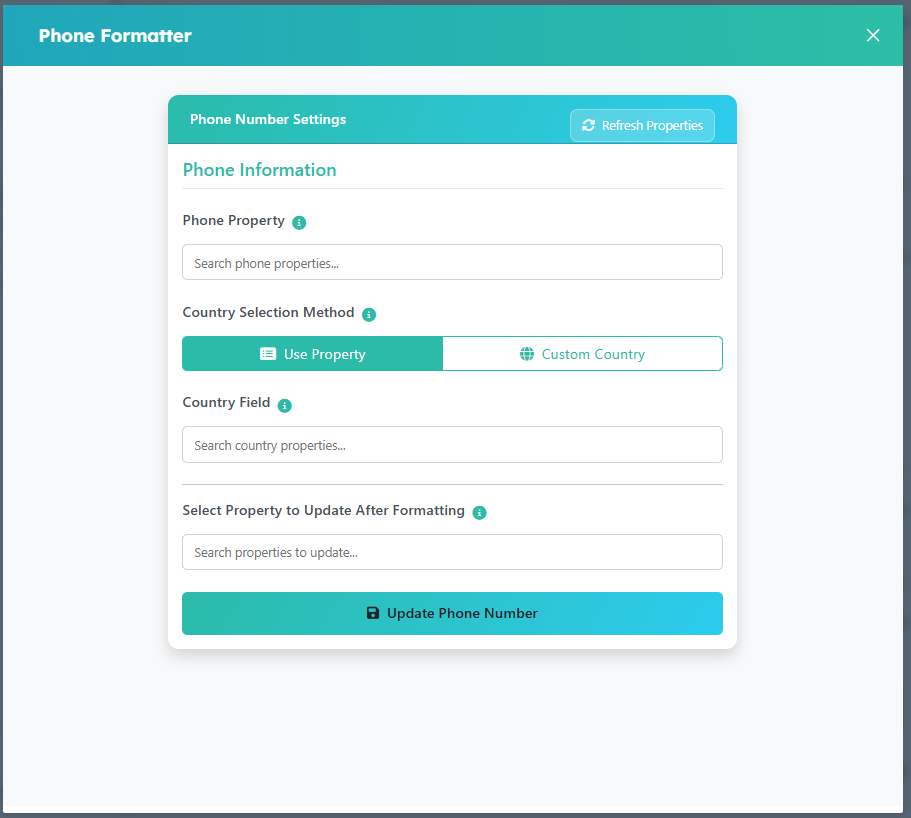
Eliminate the need to switch between applications to correct phone numbers. Update and format contact information directly within the HubSpot CRM card. This ensures your data remains clean and your team operates efficiently without ever leaving their workflow.

Shared data

Formatted Data
Contact Properties
Formatted Data
Company Properties
Note: Use these outputs across objects for reporting and automation.

Format My Leads integrates with these HubSpot features

CRM
Company records Contact management
Marketing
Contact management Workflows
Sales
Contact management Workflows
Service
Workflows

Pricing

Flat fee
$4.17 /mo
When billed yearly
  • Supercharge your workflows
  • Simple to use
  • No-code workflow action
  • Dedicated Support
  • Free app updates
  • Cancel anytime
Disclaimer

Workflow steps (using Format My Leads)

Insert the action in any workflow where you collect or update phone numbers.

Choose the phone property to format and save your settings.

Optionally add a Copy property value step to write output to a specific target property.

Review mappings and enable the workflow to start auto-formatting new and existing records.

CRM Card steps

User searches and selects the property that contains phone numbers to be formatted.

  • Option 1: Use Property – Select a field in the dataset that defines each contact’s country.
  • Option 2: Custom Country – Manually specify a fixed country for formatting all numbers.

User searches and selects the property that contains country information.

User selects the property/field where the formatted phone number will be saved.

Clicking “Update Phone Number” applies the formatting logic and updates the selected property with the properly formatted number.
Format My Leads logo

Uninstalling & Cancelling

  1. In HubSpot settings → Connected Apps, remove Format My Leads.
  2. Then cancel your subscription from the dashboard to stop billing and execution of actions.
Content updated for “Format My Leads”. Header & footer intentionally omitted.